


In the modern digital landscape, a seamless connection is no longer a luxury—it is a necessity. Whether you are running a high-paced corporate office in the CBD or setting up a smart home in the suburbs, the foundation of your connectivity lies in professional Data Installation. Proper cabling ensures that your internet speeds are maximized, latency is minimized, and your hardware communicates without interference. In a city as fast-moving as Sydney, having a robust network infrastructure is the key to staying competitive and productive.
Beyond just the internet, a comprehensive setup involves strategic planning and execution. If you are also looking to upgrade your electrical outlets to support your new tech, you might consider professional Power Point Installation to ensure your hardware has the power it needs right where it’s required. Combining reliable power with expert Data Installation creates a workspace that is both efficient and future-proof.
Understanding the Importance of Data Installation in Sydney
As Sydney evolves into a global tech hub, the demand for high-speed data transfer has skyrocketed. From streaming high-definition content to hosting international Zoom calls, the quality of your Data Installation directly impacts your daily life. Standard Wi-Fi often falls short in large brick homes or multi-story office blocks, leading to “dead zones” and frustrating dropouts.
Why Hardwired Connections Matter
While wireless technology has improved, hardwired Data Installation remains the gold standard for stability. Physical cables provide a dedicated pathway for data, which means:
- Reduced Latency: Essential for gaming and real-time video conferencing.
- Higher Security: Hardwired networks are much more difficult to hack than Wi-Fi signals.
- Consistent Speeds: No interference from household appliances or neighboring networks.
The Role of Professional Installers
DIY might seem tempting, but professional Data Installation ensures compliance with Australian standards (S009). Licensed technicians understand how to avoid “crosstalk” and electrical interference, which can significantly degrade your signal if cables are run too close to power lines.
Types of Cabling for Modern Data Installation
Not all cables are created equal. Depending on your specific needs in Sydney, the type of cable used during your Data Installation will determine your network’s ceiling for speed and bandwidth.
Cat5e: The Legacy Standard
Although becoming less common, Cat5e is still used in some basic residential Data Installation projects. It supports speeds up to 1 Gbps, which is sufficient for basic web browsing but may struggle with high-intensity data tasks.
Cat6 and Cat6a: The Modern Choice
Cat6 is currently the most popular choice for Data Installation in Sydney homes and small businesses.
- Cat6: Supports 10 Gbps at distances up to 55 meters.
- Cat6a: An augmented version that supports 10 Gbps at a full 100 meters and features better shielding against interference.
Fiber Optic Solutions
For large enterprises or specialized high-speed requirements, fiber optic Data Installation provides virtually unlimited bandwidth. Fiber uses light instead of electrical signals, making it immune to electromagnetic interference.
Residential Data Installation: Building a Smart Home
The rise of IoT (Internet of Things) means our homes are more connected than ever. A proper Data Installation strategy for a Sydney home involves more than just a router in the hallway; it involves creating a central hub that services every room.
Home Office Requirements
With the “work from home” trend becoming permanent for many Sydney-siders, a dedicated Data Installation for the home office is vital. This ensures that while the kids are streaming movies in the living room, your video calls remain crystal clear.
Smart Security Systems
High-definition security cameras require a constant, high-bandwidth stream. A professional Data Installation ensures that your CCTV cameras are hardwired via PoE (Power over Ethernet), providing both power and data through a single cable.
Entertainment and Media Rooms
For the ultimate home cinema experience, Data Installation should include direct lines to your Smart TV, gaming consoles, and audio receivers. This prevents buffering during 4K streaming and provides the lowest possible ping for online gaming.
Commercial Data Installation: Powering Sydney Businesses
For businesses, downtime equals lost revenue. A professional Data Installation is the backbone of any commercial operation, supporting everything from VoIP phones to cloud-based server access.
Structured Cabling Systems
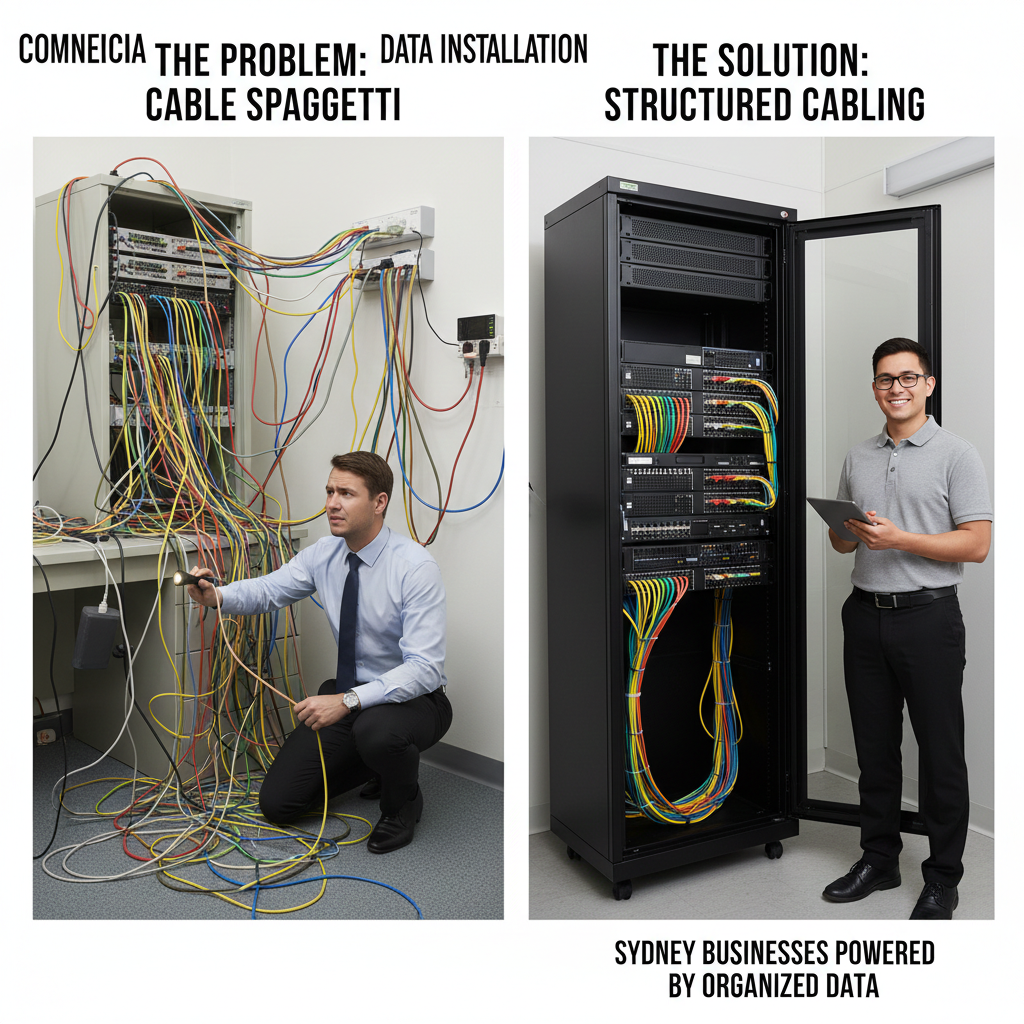
In a commercial environment, we utilize “Structured Cabling.” This is an organized approach to Data Installation where all cables run back to a central patch panel in a server rack.
- Scalability: Easily add new workstations as your team grows.
- Troubleshooting: Quickly identify and fix cable issues without tearing apart the office.
- Aesthetics: Keeps the workspace clean and free of “cable spaghetti.”
Warehouse and Large Scale Facilities
Sydney’s industrial sectors require specialized Data Installation. Large warehouses often need long-run cabling or wireless access point (WAP) arrays to ensure that inventory scanners and logistics software remain connected across vast floor areas.
Technical Specifications Comparison
When planning your Data Installation, it is helpful to compare the capabilities of different cabling categories.
| Cable Type | Max Data Rate | Bandwidth | Max Distance | Best Use Case |
| Cat5e | 1 Gbps | 100 MHz | 100m | Basic Home Use |
| Cat6 | 1 Gbps (10 Gbps short run) | 250 MHz | 100m | Standard Office / Home |
| Cat6a | 10 Gbps | 500 MHz | 100m | High-Performance Business |
| Cat7 | 10 Gbps | 600 MHz | 100m | Data Centres |
| Fiber Optic | 40/100 Gbps+ | High | 2km+ | Backbone / Enterprise |
The Process of a Professional Data Installation
What should you expect when you hire a technician for Data Installation in Sydney? The process is methodical to ensure long-term reliability.
Site Survey and Planning
The first step is a thorough walkthrough. We identify the best locations for data points, the optimal path for cabling to avoid electrical interference, and the location for the central hub or server rack.
Rough-in Stage
During this phase of the Data Installation, cables are pulled through walls, ceilings, or underfloor spaces. In new builds, this happens before the plasterboard is installed. In existing Sydney homes, we use specialized tools to “fish” cables through cavities.
Termination and Testing
Once the cables are in place, they are “terminated” into jacks or patch panels. A critical part of Data Installation is the testing phase. We use digital testers to ensure every strand of wire is connected correctly and meets the required speed standards. Check out the ACMA (Australian Communications and Media Authority) guidelines to learn more about the strict regulations surrounding telecommunications cabling in Australia.
Common Challenges in Sydney Data Installation
Sydney presents unique challenges for Data Installation, ranging from heritage-listed buildings to modern high-rises.
Heritage Homes and Thick Walls
Many suburbs in Sydney feature beautiful older homes with thick sandstone or double-brick walls. These are notorious for blocking Wi-Fi signals. A professional Data Installation in these properties often requires creative cabling routes through floorboards or external conduits to maintain the home’s aesthetic while providing modern speeds.
Dealing with Interference
In dense urban areas, electromagnetic interference (EMI) is a major concern. During Data Installation, we must ensure that data lines are properly shielded and separated from high-voltage power lines to prevent “noise” on the network.
Future-Proofing
Technology moves fast. When performing a Data Installation, we always recommend “over-speccing” the cable. Installing Cat6a today instead of Cat5e ensures that your property is ready for the next decade of internet speed increases without needing to rewire.
Maintenance and Upgrades for Your Data Infrastructure
A Data Installation is not a “set and forget” project. Regular maintenance ensures your network remains at peak performance.
Routine Audits
For businesses, an annual audit of your Data Installation can identify frayed cables, loose connections, or outdated hardware that might be bottlenecking your productivity.
Upgrading Legacy Systems
If your Sydney office is still running on old Cat5 cabling, you are likely experiencing significant slowdowns. Upgrading your Data Installation to Cat6 or Fiber can provide an immediate and noticeable boost to office efficiency.
Benefits of Local Sydney Expertise
Choosing a local Sydney team for your Data Installation offers several advantages:
- Knowledge of Local Infrastructure: Understanding the NBN rollout patterns in different Sydney suburbs.
- Rapid Response: Quick on-site support for repairs or urgent expansions.
- Compliance: Full adherence to New South Wales building codes and Australian telecommunications standards.
Environmental Considerations
Sydney’s climate can be humid. High-quality Data Installation uses cables with jackets designed to withstand local environmental factors, preventing degradation over time.
The Rise of Power over Ethernet (PoE) Technology
Simplifying Hardware Connectivity
One of the most significant advancements in modern Data Installation is Power over Ethernet (PoE). This technology allows a single Cat6 or Cat6a cable to provide both a data connection and electrical power to a device. This is incredibly useful for devices located in hard-to-reach places where installing a traditional power outlet would be expensive or impractical.
Common PoE Applications
- IP Security Cameras: Power your entire surveillance network through your data switches.
- VoIP Phones: Eliminate the need for bulky power adapters on every office desk.
- Wireless Access Points: Mount high-performance Wi-Fi units on ceilings without needing a nearby power point.
Strategic Placement of Data Points in Sydney Offices
Maximizing Workspace Efficiency
A successful Data Installation isn’t just about the quality of the cable; it’s about where those cables end up. In a commercial Sydney setting, strategic placement is vital for a clean and functional office layout. We recommend mapping out high-traffic areas and fixed workstations before the cabling begins to avoid trailing leads across the floor.
Planning for Communal Areas
Don’t forget the boardrooms and breakrooms. High-quality Data Installation in meeting rooms ensures that presentations run smoothly without “lagging” when connecting to external clients. Dedicated ports for printers and shared storage devices (NAS) also help reduce the load on your wireless network.
Protecting Your Network with Proper Cable Management
Avoiding the “Spaghetti” Effect
In many older Sydney buildings, years of haphazard additions result in a mess of tangled wires. Professional Data Installation includes the use of cable trays, Velcro ties (not plastic zip ties, which can crimp the internal wires), and labeled patch panels. This level of organization makes future upgrades significantly cheaper and faster.
Benefits of Organized Racks
- Improved Airflow: Prevents servers and switches from overheating.
- Faster Repairs: Technicians can identify specific lines instantly.
- Professional Aesthetic: Impresses clients and maintains a tidy workspace.
Enhancing Home Security Through Data Installation
The Foundation of Smart Surveillance
With security being a top priority for Sydney residents, hardwired Data Installation for security systems has become standard. Unlike battery-powered Wi-Fi cameras that can be jammed or lose signal, a hardwired system is always “on.” This provides a reliable, high-bitrate stream that is essential for facial recognition and license plate identification.
Integration with Smart Hubs
By running dedicated data lines to your security hub, you can integrate your cameras, smart locks, and video doorbells into a single, cohesive system. This ensures that your security data is transmitted securely to your cloud storage or local NVR without clogging up the Wi-Fi you use for browsing.
Wi-Fi 6 and the Need for Better Backhaul
Why Better Wi-Fi Requires More Cables
It sounds counterintuitive, but to get the best “wireless” performance, you need more wires. The latest Wi-Fi 6 and 6E standards offer incredible speeds, but they require a high-speed “backhaul” via Data Installation to function at their peak. Connecting your Wireless Access Points (WAPs) back to the router via Cat6a ensures the wireless signal doesn’t become a bottleneck.
Eliminating Dead Zones in Sydney Multi-Storey Homes
Sydney’s architecture often includes multi-level terraces or concrete-slab apartments. A single router cannot penetrate these materials effectively. A professional Data Installation involves running cables to each floor to install “Access Points,” creating a seamless mesh network where your devices automatically switch to the strongest signal as you move.
Testing and Certification for Peace of Mind
Validating Your Data Installation
The final and most crucial step of any professional Data Installation is the certification process. We use specialized Fluke testers to verify that every cable installed meets the specific decibel and frequency requirements for its category. This is not just a simple “connection test,” but a comprehensive analysis of the cable’s performance.
Why Certification Matters for Businesses
For Sydney businesses, a certified Data Installation often comes with a long-term warranty (sometimes up to 25 years on the parts). It provides documented proof that your infrastructure can handle the advertised speeds, which is essential for insurance purposes and building compliance.
Conclusion
In conclusion, investing in a high-quality Data Installation is one of the smartest moves you can make for your Sydney home or business. It provides the stability, speed, and security that wireless connections simply cannot match. From selecting the right grade of copper to the final certification of your network points, every step of the Data Installation process contributes to a smoother, faster digital experience. By choosing professional technicians, you ensure that your infrastructure is compliant, efficient, and ready to handle the demands of tomorrow’s technology.
Ready to transform your connectivity? Our team of licensed experts is standing by to design and implement a custom solution tailored to your specific needs. Whether it’s a small home office or a multi-level corporate building, we bring precision and local expertise to every project. Contact us today to get a quote today and take the first step toward a faster, more reliable network.
Frequently Asked Questions
How long does a typical data installation take?
A standard residential Data Installation with 2–4 points usually takes between 3 to 5 hours. Larger commercial projects can take several days depending on the number of points and the complexity of the building’s structure.
Do I really need Cat6a for my home?
While Cat6 is sufficient for most current home internet speeds, Cat6a is recommended if you do heavy 4K video editing, large file transfers, or want to future-proof your home for upcoming 10 Gbps hardware.
Can I run data cables next to my power cables?
No, this is not recommended. Running data cables too close to power cables causes electromagnetic interference, which slows down your connection. Professional Data Installation follows strict separation rules to ensure signal integrity.
Is professional data installation required for NBN?
While the NBN brings the signal to your house, the Data Installation inside your home (distributing that signal to different rooms) is your responsibility. Professional cabling ensures you actually get the speeds you are paying for from your provider.
What is the difference between a data point and a Wi-Fi extender?
A data point is a physical socket in the wall that provides a direct, wired connection to your router. A Wi-Fi extender simply boosts a wireless signal, which often results in halved speeds and increased latency compared to a wired Data Installation.
Will data installation damage my walls?
In most cases, no. Experienced technicians use specialized tools to “fish” cables through existing wall cavities. If we need to cut a hole for a new outlet, we use professional mounting brackets and wall plates for a clean, flush finish.
